
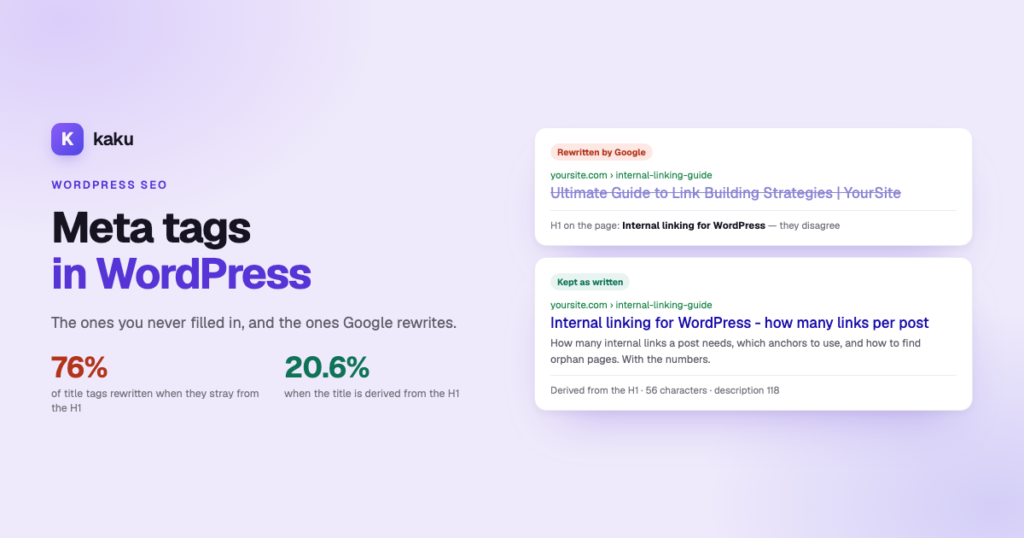

Google rewrites roughly three in four title tags and about 70% of meta descriptions — so most of what a bulk generator produces never reaches a search result. The single biggest cause is a title that disagrees with the page’s H1: when the two match, the rewrite rate falls from 76% to about 20%. Derive the title from the H1 and most of the problem disappears.
Every meta tag tool is sold the same way: point it at your site, press the button, five hundred titles appear. That part is true. The question nobody in that market answers is how many of those five hundred survive contact with Google. This is the companion to deciding which pages need a description at all: that one is about which pages, this one about what to write so the work does not get thrown away.
On this page
- What an SEO title is, and where WordPress keeps it
- The number nobody selling a meta generator mentions
- Why Google rewrites your title tag
- The one change that halves the rewrite rate
- SEO title length: the character counts that survive
- How to write a meta description that gets kept
- The phrases that give an AI draft away
- Doing 500 of them in WordPress
- How to tell whether it worked
What an SEO title is, and where WordPress keeps it
An SEO title is the text in a page’s <title> tag — the blue link in a Google result and the label on the browser tab. It is not the post title you type in the editor, which becomes the page’s H1. The two can say different things, and that gap is where most of the problems in this article start.
In WordPress you change the SEO title in your SEO plugin, not in the post: the SEO title field in Yoast’s panel, Edit snippet in Rank Math, or the equivalent field in AIOSEO and SEOPress. Leave it empty and the plugin builds one from a template — usually the post title plus your site name.
The number nobody selling a meta generator mentions
When Google replaces a title it does not tweak it — it keeps only about a third of what you wrote. The numbers are worth seeing together:
| What Google does | How often | Detail |
|---|---|---|
| Rewrites the title tag | 76% | McAlpin study of thousands of keywords, Q1 2025. Rewrites drop ~2.71 words and keep ~35% of the original. |
| Rewrites the meta description | 68–71% | 71% on mobile, 68% on desktop — it swaps in text matching the specific query. |
| Keeps the title | ~79% of the time when the title matches the H1 | The rewrite rate falls to about 20.6% in that case. This is the lever. |
This does not make meta tags pointless. Even when Google writes the description itself, it builds it from your page — so a page that answers clearly gets a better snippet. And the titles that do survive tend to be the ones on pages you cared enough about to write properly. But it does mean that a bulk run with no rule behind it is mostly wasted effort.
Why Google rewrites your title tag
Rewrites are not random. They cluster around a handful of causes:
- The title does not match the page’s main heading. If your H1 says one thing and the title tag promises another, Google resolves the conflict in favour of the H1. This is the most common cause by a distance.
- It is too long. Past about 60 characters the end gets cut off, and Google tends to replace a cut-off title rather than just shorten it.
- Your site name is eating it. Themes and SEO plugins add the site name to the end of every title. On a long title, that pushes the useful half off the screen.
- Too many keywords. Repeating the phrase, or stringing terms together with pipes, reads as written for robots and gets replaced.
- The language does not match the page. A Spanish page with an English title gets rewritten almost every time.
- It is too vague to match the query. “Complete guide” tells Google nothing about which queries the page answers.
Google is not punishing you. It is choosing between your title and what it can assemble from your page, and it picks whichever matches the query better.
The one change that halves the rewrite rate
If you only take one rule from this: derive the title from the H1. Same topic, same primary keyword, sharpened for clarity and appeal — not a new angle, not a cleverer hook.
It is counterintuitive, because writing a differently-worded title feels like covering more ground. In practice it is the fastest way to get your title discarded: you have told Google two different things about one page, and it trusts the heading.
The only case for ignoring this is a page whose H1 is genuinely useless — “Home”, “Untitled”, “Blog”. Then build the title from the content instead, and fix the H1 while you are there.
Three SEO title examples, before and after applying the rule:
| The page’s H1 | Title that gets rewritten | Title derived from the H1 |
|---|---|---|
| Keyword cannibalization in WordPress: how to find it, and how to fix it | The Ultimate SEO Guide | Blog | Site Name | Keyword Cannibalization in WordPress – How to Find and Fix It |
| Beginner surfboards | Surfboards | Best Prices | Free Shipping | Shop | Beginner Surfboards – Soft-Tops and Foam Boards to Learn On |
| How to repair a leaking tap | Home | Plumbing Tips | How to Repair a Leaking Tap – Step by Step |
This is also the rule that makes bulk generation viable at all. An AI that is told to invent a compelling title per page will produce five hundred creative titles, most of which Google bins. One told to derive each title from that page’s H1 produces titles that survive — and, usefully, it fails visibly when the H1 is bad, which tells you something worth knowing.
SEO title length: the character counts that survive
Pixel widths vary by character, so nobody can give you an exact limit. These are the working ranges, and the reasoning behind each:
| Field | Target | Hard limit | Why |
|---|---|---|---|
| Meta title | 50–60 characters | 60 | Past 60 the tail is cut on most desktop results and much sooner on mobile. |
| Meta description | 145–155 characters | 160 | Google shows roughly 155–160 on desktop and less on mobile. |
| First 100 characters of the description | — | — | Mobile truncates hardest. Put the primary keyword and the actual value here, not after. |
Derived from the page’s own H1 — the change that takes the rewrite rate from 76% to about 20.6%.
That is Kaku’s AI SEO title generator above — the Meta-Tag Optimizer — doing it to the rules in this section: derived from the H1, inside the character counts, written into the SEO plugin you already run.
Two more SEO title best practices that cost nothing:
- Use a hyphen, not a pipe. “Keyword cannibalization in WordPress – how to fix it” reads as a sentence; the pipe reads as a template and is a common ingredient in titles that get replaced.
- Do not append your brand name. On most pages it spends five to fifteen characters telling people something the URL already says. Reserve it for the home page and commercial pages where the brand is the draw.
How to write a meta description that gets kept
The description has no direct effect on ranking. It has a large effect on click-through, which is why it is worth writing well on the pages that already rank — and why picking those pages first matters more than the writing itself.
- Answer the query in the first clause, not “In this guide we explore…”. If the page says merge or retarget depending on a position gap, say that.
- Front-load the keyword and the value within 100 characters, because that is what a phone shows.
- Be concrete and active. “Score every overlap and decide what to merge” beats “Learn about content optimization strategies” — and generic text is exactly what Google replaces with a snippet from the body.
- Write in the page’s own language, which matters more than it sounds: Google rewrites titles whose language differs from the content.
- Never promise what the page does not deliver. A description that oversells earns the click and loses the visit.
The phrases that give an AI draft away
If you are generating these with a model, there is a recognisable house style that makes copy read as machine-written. It is worth banning explicitly in the instructions rather than editing out afterwards:
| Banned opener | Why it fails |
|---|---|
Discover… · Unlock… · Elevate… | Spends the first and most valuable characters saying nothing about the page. |
In today's world… · In the digital age… | Pure preamble. Mobile truncates before you reach the point. |
Comprehensive guide to… | Describes the format instead of the answer. Matches no specific query. |
| ALL CAPS, emoji, quotation marks | Emoji are stripped, quotes break the snippet, caps read as spam. |
| Invented numbers, dates or years | The worst failure: it is a factual claim. If the figure is not in the page, it is fabricated. |
That last one deserves emphasis on a bulk run. A model asked for a compelling title will happily write “7 fixes” for a page with four, or append the current year to a page that never mentions it. At five hundred pages nobody checks, and you have published five hundred small inaccuracies. Only use a number if it exists in the H1 or the content.
Doing 500 of them in WordPress
The manual version is unbeatable for twenty pages and impossible for five hundred. A workable bulk process looks like this:
- Prioritise before generating. A 500-page site where 30 pages get impressions should do those 30 first — working out which takes ten minutes and changes what the work is worth.
- Generate in batches of up to 200, which keeps the job reviewable. A single run of 5,000 is a run nobody reads.
- Review in a table, not page by page. Seeing all the titles in one column is the only practical way to catch repetition and drift.
- Check the character counts before publishing, not after — the step tools get wrong most often. A model asked for “under 60 characters” will still hand you 68.
- Publish, then leave it for three weeks, so you have enough post-change data to compare like with like.
How to tell whether it worked
Meta work is unusually easy to measure, because the page has not changed — only the snippet. Compare two equal-length windows in Search Console, before and after, on the same pages:
| What moved | What it means | Do next |
|---|---|---|
| CTR up, position flat | The rewrite worked. This is the outcome you wanted. | Apply the same pattern to the rest of the batch. |
| CTR flat, position flat | Google is probably still rewriting your title. | Compare your title against the H1 — they likely disagree. |
| CTR down | The new title matches the query worse than what Google had been substituting. | Revert, and take the query wording from Search Console rather than from memory. |
| Impressions up, CTR down | Not a failure: the page started ranking for broader queries. | Check the query mix before treating it as a regression. |
Give it three to four weeks. Google usually recrawls within one to fourteen days, but a CTR computed on four days of data will talk you out of a change that was working.
If you want this done in bulk without the spreadsheet, that is what Kaku’s AI meta description and SEO title generator is for. It derives each title from that page’s own H1 for the reason described above, holds titles to 50–60 characters and descriptions to 145–155, front-loads the keyword into the first 100, refuses the AI openers listed earlier, and will not invent a number that is not in the page. It writes in the page’s own language, into whichever SEO plugin you already run — Yoast, Rank Math, AIOSEO or SEOPress — rather than replacing it.
Two things before you click: you need one of those SEO plugins active, because that is where the fields live. And everything is generated as a draft you review in a table first — bulk generation without a review step is how five hundred small inaccuracies reach a live site.
Write meta tags Google keeps
Connect your WordPress and let Kaku draft your titles and descriptions to the rules above — derived from each page’s H1, inside the character counts, in batches you approve before anything goes live.
SEO titles and meta descriptions, answered
Aim for 50 to 60 characters and treat 60 as the limit: past that most desktop results cut the end, and mobile cuts sooner. The real limit is in pixels, so a title full of wide letters truncates earlier than one of narrow ones.
Most often because it disagrees with your H1. Google resolves the conflict in favour of the page’s main heading. Other frequent causes are titles over about 60 characters, boilerplate site names eating the useful part, keyword repetition, and a title whose language differs from the page.
About 76% of the time according to a Q1 2025 study of thousands of keywords, up from 61% in 2023. When it rewrites, it drops around 2.71 words and keeps only about 35% of the original. Meta descriptions are rewritten 68% of the time on desktop and 71% on mobile.
Derive the title from the page’s own H1 rather than writing a different angle. The rewrite rate falls from 76% to about 20.6% when the two match. Then keep it under 60 characters, drop the appended site name, avoid keyword repetition and write in the same language as the page.
Yes, with two conditions: derive each title from that page’s own H1 rather than inventing an angle, and review the batch in a table before publishing. The failure that matters is not clumsy writing, it is invented specifics — a number or a year that is not in the page.
Usually not. It costs five to fifteen characters on every page to repeat something the URL already shows, and on long titles it pushes the informative part past the truncation point. Keep it for the home page and pages where the brand is the reason someone clicks.
Google typically recrawls within one to fourteen days, but wait three to four weeks before judging so you have enough post-change data. Compare equal-length windows, not a partial week against a full month.