
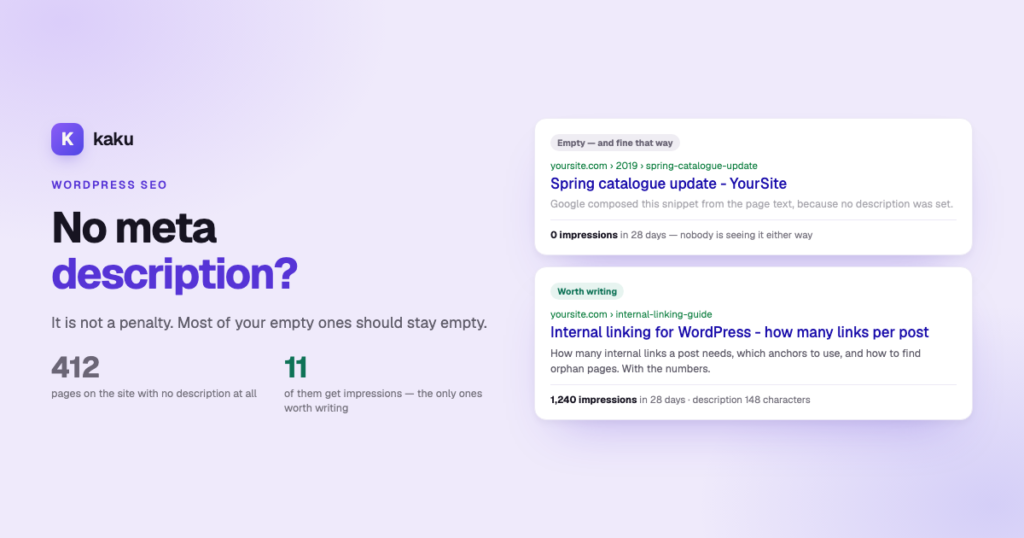

A missing meta description is not a penalty, and most of your empty ones should stay empty. Google composes a snippet from the page when the field is blank, and on a page nobody searches for, that is a perfectly good outcome. The work is not filling in 400 fields — it is finding the small number of pages that actually appear in search results and writing those properly.
Open the posts list on almost any WordPress site more than a year old, sort by SEO status, and the picture is the same: a handful of recent pages done properly and a long tail of everything else with nothing. It looks like a backlog, it gets counted like debt, and every SEO plugin will happily show you the number in red — while Lighthouse adds its own warning, “Document does not have a meta description”. The good news is that the red number is mostly noise — this guide is about telling the part that matters from the part that doesn’t.
On this page
What actually happens when the field is empty
Titles and descriptions behave completely differently when left blank, and most people assume they are the same problem. They are not:
| Field left empty | What actually happens | How bad is it |
|---|---|---|
| SEO title | Your SEO plugin fills it from a template, usually %%title%% %%sep%% %%sitename%%. You always have a title — just not one anybody chose. | Mild. Usually workable, but the appended site name eats characters and can push the useful part past the cut-off. |
| Meta description | By default there is no template fallback. Google composes a snippet from the visible text of the page, picking whatever matches the query. | Not a penalty. It is not a ranking factor and Google has said plainly that a page without one is fine. What you lose is control of the snippet. |
An empty meta description is not a hole in your SEO. It is a snippet written by Google instead of by you — and on a page nobody searches for, that is a perfectly good outcome.
This reframes the whole job. “Fill in all the missing meta descriptions” sounds like debt to be cleared; it isn’t. Google’s own guidance is that for minor pages there is no need to write one, and that the effort belongs on the pages that matter. Which raises the only question worth answering.
Where the gaps come from
Where the gaps cluster tells you how much of the red number is genuinely invisible content:
- Anything imported in bulk. Migrations, CSV imports and WooCommerce catalogues arrive with the fields empty, and nobody goes back.
- Posts older than the SEO plugin. Content published before Yoast or Rank Math was installed has no meta because there was nowhere to put it.
- Everything after the first enthusiastic month, plus the pages nobody thinks of as content — category archives, page-builder landings — and, on multi-author sites, whatever half the team decided was optional.
Notice how much of that is content that was never going to rank anyway. An archive page, a 2019 post about a product you no longer sell, four hundred imported SKUs — none of them are waiting for a description.
Which ones are worth filling in
A description only earns its keep on a page that appears in search results. On a typical site that is a small minority of the URLs, and Search Console will tell you exactly which. Work down this order:
- Export your pages from Search Console for the last 28 days (Performance → Search results → Pages → Export). Anything with zero impressions is not waiting for a meta description; it is waiting for a reason to exist.
- Start with pages that already rank and get clicked badly. These are the highest-return rewrites on the site — how to pull that list is a guide of its own.
- Then the pages with impressions and no description at all. These are the genuine gaps: Google is already showing them, and it is writing their snippet for you.
- Then commercial pages regardless of impressions — pricing, product, contact. Low volume, high consequence, and you want to control how they read.
- Everything else can wait indefinitely, and on most sites it should. Filling four hundred descriptions for pages with no impressions is a week spent on something no one will ever see.
The reframe worth taking into a meeting: “we have 400 pages missing meta descriptions” is an alarming sentence that means very little. “Thirty of our pages get impressions and eleven of those have no description” is a morning of work with a measurable result. Same site, same data — one of them gets approved.
How to add a meta description in WordPress, and where it lives
Adding one takes a minute per page, and the field is always in the same place: your SEO plugin’s panel in the post editor.
- Yoast: open the post, find the Yoast SEO box and fill in Meta description under the search appearance preview.
- Rank Math: open the Rank Math panel and click Edit snippet; the description is the second field.
- AIOSEO and SEOPress: the settings box below the editor has a Meta description field on its first tab.
- Update the post, then check the preview the plugin shows — it is a fair approximation of the length Google will display.
One thing that surprises people: WordPress core has no meta title or meta description field. Both are stored by whichever SEO plugin you run, in its own post meta keys. That has three practical consequences.
- You need an SEO plugin active for the fields to exist at all. Yoast, Rank Math, AIOSEO and SEOPress all provide them; with none installed there is nowhere to write. This also applies to any tool you point at your site, including ours.
- Switching plugins does not always carry them across. Most offer an importer — run it, then spot-check, because a silent partial migration looks exactly like a site that never had descriptions.
- Templates fill the gaps. Where a page has no explicit title, the plugin generates one from a template, usually
%%title%% %%sep%% %%sitename%%. That is the mechanism quietly appending your brand name to every title and eating characters. - Descriptions can be templated too, but it rarely helps. Yoast lets you set a default description with the
%%excerpt%%variable — the “automatic meta description” people look for. It copies the excerpt, so the result is only as good as an excerpt nobody wrote with a searcher in mind.
Worth checking on any site you inherit: a title template that appends the site name on a long-titled page is a truncation machine. You can often recover ten to fifteen characters across the whole site with one template change — and it costs nothing and touches no individual page.
Meta description best practices for the pages you fill in
For the pages that made the cut, the description has no direct effect on ranking. It has a large effect on click-through, which is exactly why it is worth writing well on the pages that already rank.
| Field | Target | Hard limit | Why |
|---|---|---|---|
| Meta title | 50–60 characters | 60 | Past 60 the tail is cut on most desktop results and much sooner on mobile. |
| Meta description | 145–155 characters | 160 | Google shows roughly 155–160 on desktop and less on mobile. |
| First 100 characters of the description | — | — | Mobile truncates hardest. Put the primary keyword and the actual value here, not after. |
- Answer the query in the first clause, not “In this guide we explore…”, and front-load the keyword and the value inside 100 characters — that is what a phone shows.
- Be concrete and active. “Score every overlap and decide what to merge” beats “Learn about content optimization strategies”; generic text is exactly what Google replaces with a snippet from the body.
- Never promise what the page does not deliver. A description that oversells earns the click and loses the visit.
There is a second half to this, and it is why a lot of carefully written meta tags never reach a search result at all: Google rewrites roughly three in four title tags. Why it does that, and the one change that cuts the rewrite rate to about a fifth, is the companion to this guide — worth reading before you write in bulk.
Meta description examples: before and after
The rules are easier to see in a table than in a list. Each row is a common page type, a description that gets replaced, and one that answers the searcher:
| Page | Weak description | Good meta description example |
|---|---|---|
| Meta description for a blog post | In this post we will explore everything you need to know about keyword cannibalization. | Two pages ranking for the same query isn’t always cannibalization. Three filters tell real overlap from noise, and how to fix it in WordPress. |
| Product page | High quality product at the best price. Buy now! | Soft-top beginner surfboard in 7 and 8 ft, stable and forgiving on small waves. Fins and leash included; ships in two days. |
| Service page | Welcome to our website. We offer many services. | Emergency plumber in Valencia, day and night. Fixed call-out price and a written quote before any work starts. |
| Category archive | Archive of all posts in this category. | Leave it empty unless it gets impressions. If it does: say what the reader finds there, in one line, with the topic’s main term. |
What the good meta description examples share: the answer or the concrete offer in the first clause, the term people actually search, a specific detail the weak version lacks, and nothing the page cannot back up.
Doing it without losing a week
The manual version is unbeatable for twenty pages and impossible for five hundred, which is why nearly every WordPress site has this long tail in the first place. Done by hand, the order in section three is what keeps it to a morning instead of a week. If you would rather not, Kaku’s bulk meta description generator — the Meta-Tag Optimizer — derives each title from that page’s own H1 (there is a measured reason — see the companion article), holds titles to 50–60 characters and descriptions to 145–155, and writes into whichever SEO plugin you already run rather than replacing it.
Two things before you click: you need Yoast, Rank Math, AIOSEO or SEOPress active, because that is where the fields live. And everything is generated as a draft you review in a table first — bulk generation without a review step is how five hundred small inaccuracies reach a live site.
See how many of your pages actually need one
Connect your WordPress and Kaku shows you which pages have no description and which of those get impressions — then drafts them to the rules above, in batches you approve before anything goes live.
Missing meta descriptions, answered
It answers the query or states the offer in the first clause, uses the term people search, adds one concrete detail and stays under about 155 characters. For a how-to post: “Two pages ranking for the same query isn’t always cannibalization. Three filters tell real overlap from noise, and how to fix it in WordPress.”
No. Export your pages from Search Console first: anything with zero impressions in 28 days gains nothing from a description, because nobody is seeing it in results. Fill in the pages that already get impressions, plus your commercial pages regardless of volume, and leave the rest. Google composes a snippet for the others and that is a perfectly acceptable outcome.
Not directly. It is not a ranking factor, and Google has said a page without one is fine — it will build a snippet from the page’s visible text instead. What you lose is control over how the page is described, which matters on pages that actually appear in results and not much anywhere else.
Unlike the description, it never really is: your SEO plugin generates one from a template, usually the post title plus a separator plus the site name. So you always have a title — just not one anybody chose, and the appended site name can push the informative part past the truncation point.
Nowhere by itself. WordPress core has no such fields: they belong to your SEO plugin — Yoast, Rank Math, AIOSEO or SEOPress — which stores them in its own post meta. Without one of those installed there is nothing to write into, for you or for any tool you point at the site.
Aim for 50–60 characters for the title and never exceed 60. For the description aim for 145–155 and never exceed 160, with the primary keyword and the core value inside the first 100 characters, because that is roughly what a phone displays.
In this order: pages that already rank well but get clicked badly, then pages with impressions and no description at all, then commercial pages regardless of traffic. Everything with zero impressions can wait indefinitely.