
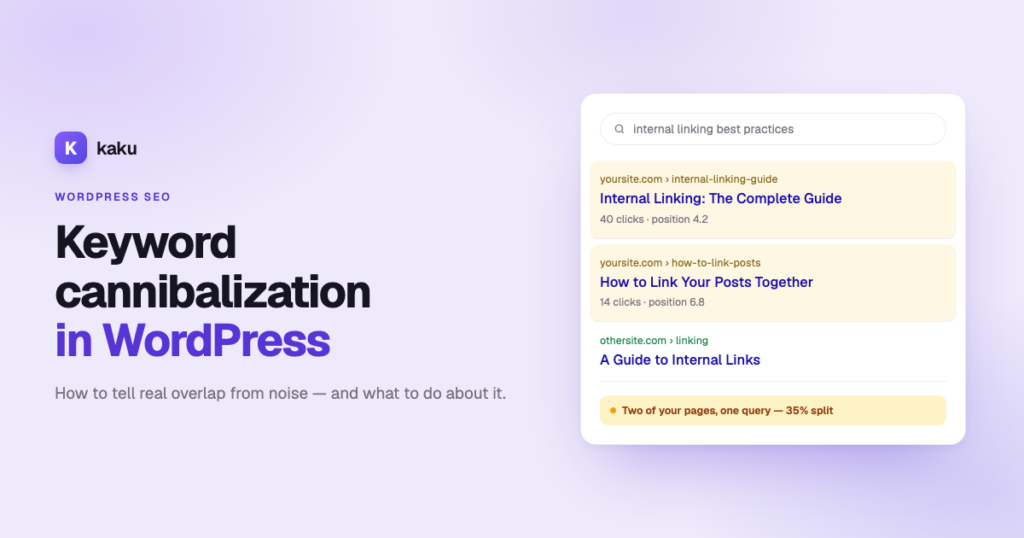

Keyword cannibalization in SEO is when two or more of your own pages compete for the same search query and split its clicks between them. In WordPress it usually comes from indexed tag archives, a category page that overlaps a post, or two posts written a year apart about the same thing. You fix it by consolidating the weaker page into the stronger one — or, when both pages genuinely rank, by retargeting one of them at a different query.
That is the short version. The longer version matters more, because most of what gets diagnosed as cannibalization isn’t. Google routinely shows more than one page from the same site for the same query, and that costs you nothing. It only becomes a problem when the second URL is actually taking clicks from the first.
On this page
- How to check for keyword cannibalization in two minutes
- What it actually costs you
- Where WordPress creates it on its own
- The three filters that separate real overlap from noise
- How to find it in Search Console
- Score it, then decide: merge or split
- How to fix keyword cannibalization, step by step
- When both pages deserve to live
- How to avoid keyword cannibalization
- Doing this at scale: a keyword cannibalization checker
How to check for keyword cannibalization in two minutes
Two minutes in Google will tell you whether this is worth your afternoon. No Search Console, no spreadsheet, no tool.
- Think of a query you want to rank for — the one you would type yourself.
- Search Google for
site:yourdomain.com "that query". - Look at what comes back. One obvious page plus some loosely related ones is normal. Two or three of your articles that could each be the answer is a candidate, and the rest of this guide is about it.
Do that for your five most important queries. It is the difference between fixing something real and reorganising your blog for fun.
One honest caveat before you invest any time. Fixing cannibalization redistributes demand that already exists — it does not create any. If no query brings you more than a handful of impressions a month, this is not your bottleneck: visibility is.
If you would rather not run the search five times, Kaku reads your Search Console and scores every overlapping query automatically. That check consumes no credits and works on every plan, including the free one — it is reading numbers, not generating anything.
What it actually costs you
There is no cannibalization penalty — Google has never had one and no update has targeted it. It is a traffic problem, and it costs you in four ways:
- Split clicks. Two results at positions 6 and 9 usually earn less together than one result at position 4.
- Split signals. Internal links, backlinks and topical relevance divided between two URLs instead of accumulating on one.
- Google flip-flopping. When two pages are close in quality it swaps which one it shows, and rankings look unstable for no visible reason.
- The wrong page ranking. The expensive one: an old informational post outranks the page you actually want people to land on. Traffic holds steady while it arrives somewhere that was never built to convert.
Where WordPress creates it on its own
Here is the part most guides bury: a lot of WordPress cannibalization is not editorial at all — the CMS generates it. You did not write these pages. WordPress created them, indexed them by default, and they have been competing with your articles ever since. Five of the seven are fixed with a setting, not a rewrite.
| Source | What happens | Fix |
|---|---|---|
| Tag archives | WordPress indexes tags by default. A tag applied to three posts becomes a thin page competing with the very posts it lists. | Yoast → Search Appearance → Taxonomies → Tags → Show tags in search results: No. Rank Math and AIOSEO have the same switch. |
| Category vs pillar post | /category/internal-linking/ and your big post about internal linking chase the same query. | Pick one. Either noindex the category, or make it the pillar and don’t write the competing post. |
| Paginated archives | /page/2/, /page/3/ pick up impressions for the archive’s term. | All the major SEO plugins handle these correctly out of the box. Verify rather than assume. |
| Attachment pages | WordPress gives every uploaded image its own URL, each one a thin page. | Yoast redirects them to the parent post by default. Confirm it is on; older migrated sites often have it off. |
| Author archives on single-author sites | The author archive duplicates the blog index exactly. | Disable it in your SEO plugin. On a one-author blog it has no reason to exist. |
| WooCommerce filters and variations | ?filter_colour=blue and variation URLs multiply near-identical product pages. | Canonical them to the parent product — the one case where a canonical is exactly the right instrument. |
| Near-duplicate posts | “Best X for beginners” and “Top X to start with”, written eighteen months apart by different people. | The genuinely editorial case, and the only one that needs real work. Consolidate — the rest of this guide is how. |
If you only do one thing from this article, do the tags. Tag archives are the most common cause on content-heavy WordPress sites and the cheapest to fix: one setting, site-wide, no analysis needed first.
The three filters that separate real overlap from noise
For the editorial cases, a query has to pass three tests before you change anything. Skip them and you will spend a weekend merging posts that were never competing.
| Filter | Threshold | Why it’s there |
|---|---|---|
| The query returns two or more of your URLs | ≥ 2 pages | A single page cannot compete with itself. This is the definition, not a judgement call. |
| The query has real demand | ≥ 50 impressions in 28 days | Below that, one click of random variance flips the reading. You would be tuning noise. |
| The second URL actually earns clicks | ≥ 1 click | The one almost every guide skips. Impressions without clicks mean Google is testing a page, not splitting your traffic between two. |
If the second URL has zero clicks, you do not have cannibalization. You have a page that Google looked at and passed over.
One detail that changes the numbers: use a 28-day window ending three days ago, because Search Console lags by about three days. And use a single recent window rather than a long range — cannibalization is a current state, not a trend, and a year-long window keeps showing you overlaps you already fixed.
How to find it in Search Console
Search Console will not hand you a cannibalization report, but the data is there. The trick is pairing the Queries and Pages dimensions, which most people use separately.
- Open Performance → Search results, last 28 days, with clicks, impressions, CTR and average position all turned on.
- In the Queries tab, sort by impressions and ignore anything under 50.
- Click a query — that applies it as a filter to the whole report.
- With the filter still active, switch to the Pages tab: every URL of yours that ranked for that one query.
- Two or more URLs, and the top two both have clicks? Candidate. Note clicks, impressions, CTR and position for each, then repeat.
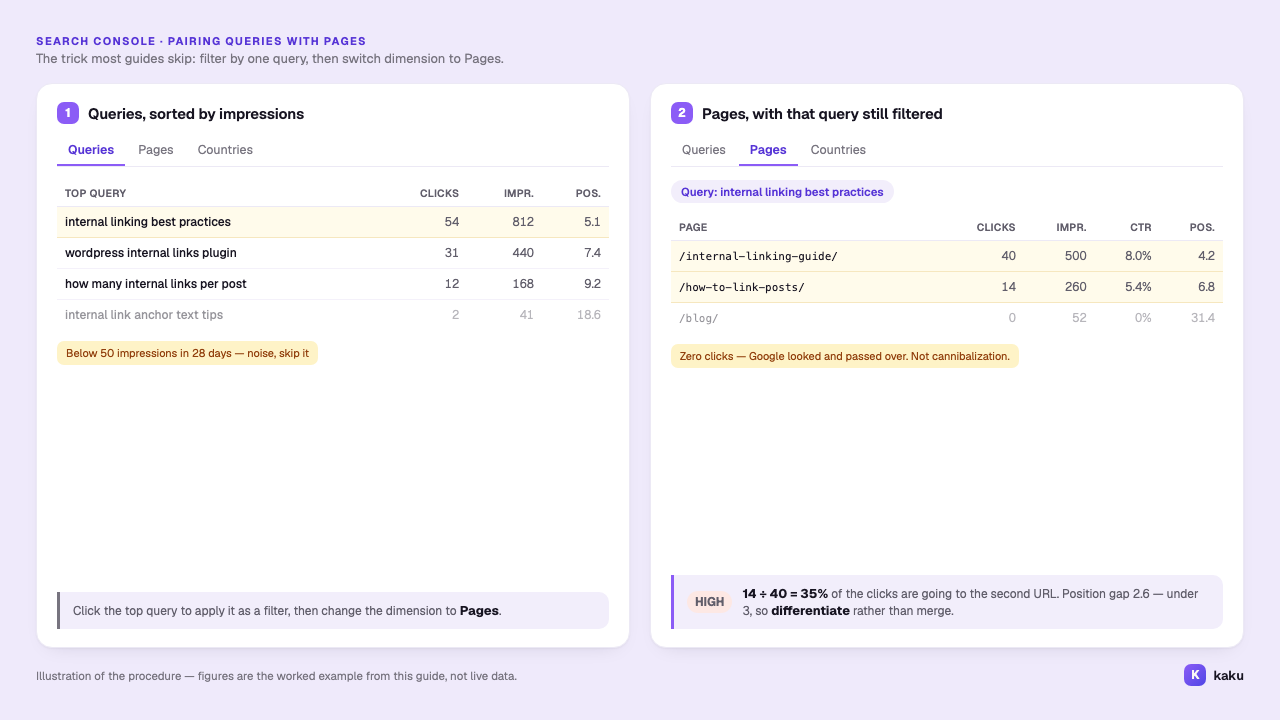
It is one query at a time, and a site with a few hundred ranking queries takes an afternoon. That is why this particular audit gets postponed forever — and why it is worth automating rather than scheduling.
Score it, then decide: merge or split
Two numbers decide everything, and you read them in the same glance. First, how much of the primary page’s traffic the second one is taking — secondary clicks divided by primary clicks:
| Secondary ÷ primary clicks | Severity | Do this |
|---|---|---|
| 25% or more | High | Genuinely competing. Fix first. |
| 10% to 24% | Medium | The primary dominates but is leaking. Fix once the high ones are done. |
| Under 10% | Low | The second page is barely in the race. Usually leave alone. |
A keyword cannibalization example: a query brings 800 impressions in 28 days. /internal-linking-guide/ takes 40 clicks at position 4.2; /how-to-link-posts/ takes 14 at position 6.8. 14 ÷ 40 = 35% — high severity, worth fixing. Had the second taken 3 clicks, that is 7.5% and your time is better spent elsewhere.
Second, the gap between their average positions, which decides whether you merge them or push them apart — the call most guides hand-wave:
| Situation | Verdict | Reasoning |
|---|---|---|
| Position gap ≤ 3 and severity is high | Differentiate | Both pages are credible and Google cannot choose. Merging discards a page that already ranks. |
| Everything else | Consolidate | One page is the clear winner and the other is diluting it. |
The logic: URLs at 4.2 and 6.8 are both strong answers and Google is alternating. At 4.2 and 22.5 there is no contest — the second is not competing, it is diluting. Default to consolidate; the other path only applies to high-severity cases where both pages already rank well.
The number to write down is “clicks at risk”: the total clicks that affected queries are splitting across your own URLs. It is the one figure worth taking into a meeting, because it turns “I spent three days on this” into something someone else can check.
How to fix keyword cannibalization, step by step
- Pick the winner on clicks, not word count. The page Google already prefers has signals you cannot see. Keep that URL even if the other post is longer or newer.
- Move the unique material across. Fold in whatever the losing page says that the winner doesn’t. If nothing is unique, you are deleting a duplicate, which is fine.
- 301 the loser to the winner. Never delete without redirecting or you lose the backlinks and 404 anyone who bookmarked it. Yoast’s redirect manager is Premium only (~$99/year); Rank Math includes redirections free and the free Redirection plugin does the job on its own.
- Repoint the internal links. The step that gets forgotten. Links still pointing at the old URL now pass through a redirect and tell Google you still think the old page is the answer — an internal link tool will find them faster than you will.
- Update the winner’s title and intro to cover the combined ground, then request indexing for that URL.
- Re-measure in 28 days. Not sooner: Google has to recrawl both URLs, process the redirect and reassess.
A note on canonical tags, which come up constantly: a canonical is for genuinely near-identical URLs, like a product in two categories. It is not the tool for two different articles competing for a query — Google treats it as a hint and ignores ones it disagrees with. Use a 301 when the page should go, and retargeting when it should stay.
When both pages deserve to live
When both pages rank well and you keep them, the job is to give each a clearly different question to answer. Rewrite the title, the H1 and the first paragraph of each — they carry most of the weight when Google decides what a page is about. A page about “how to fix X” and one about “what causes X” are different pages; “how to fix X” and “fixing X step by step” are not. Then change the internal anchor text so it mirrors each page’s new job, cut the overlapping sections, and have each link to the other for what it no longer covers.
If you cannot articulate the difference in one sentence, merge them after all.
How to avoid keyword cannibalization
Preventing it is cheaper than any of the above, and it comes down to three habits:
- Search before you write. Run the
site:check from the first section on the query you are about to target. If one of your pages already answers it, update that page instead of starting a new one. - Give every important query one owner. A plain list of target query and URL, checked before each new post, catches most overlaps before they are published.
- Noindex tag archives from day one, and keep categories and pillar posts on different queries — the settings from the WordPress section, applied before the problem exists.
If you draft posts with Kaku’s AI article writer, its topic suggestions already steer clear of the posts it has written and of the titles already on your site — the same habit, applied at the moment of writing.
Doing this at scale: a keyword cannibalization checker
Everything above works by hand, and on a small site by hand is fine. It stops being fine somewhere around a few hundred ranking queries, because the manual method is strictly one query at a time.
That is the job of Kaku’s keyword cannibalization checker, part of its Search Console Insights. It pulls query-and-page pairs for the last 28 days from your Search Console, applies exactly the filters above, scores each case by severity and tells you whether to consolidate or differentiate using the position-gap rule — then totals your clicks at risk.
Two things worth saying plainly. It needs Google Search Console connected, because it is your own data it reads rather than a third-party estimate. And cannibalization detection consumes no credits and is available on every plan, including the free one.
See your own cannibalization in a couple of minutes
Connect your WordPress site and Search Console, and Kaku scores every overlapping query on your site with the thresholds in this article — then tells you which to merge and which to split.
Keyword cannibalization, answered
It is when two or more pages of the same site compete for one search query and split its clicks between them. It only costs you anything when the second page actually earns clicks; if it just collects impressions, Google has already picked the other page and nothing is being split.
No. There is no penalty for it and no algorithm update has targeted it. The cost is indirect: clicks split across two of your URLs, internal links and backlinks divided between them, and unstable rankings as Google alternates which page to show.
No, and this is the most common misdiagnosis. If the second URL picks up impressions but no clicks, nothing is being split — Google looked at it and chose the other page. Only treat it as cannibalization when the second URL is actually earning clicks.
Search Google for site:yourdomain.com followed by your target query in quotes. If two or three of your own articles come back and each could plausibly be the answer, you have a candidate worth investigating. It takes ten seconds per query and needs no Search Console access at all.
Use a 301 when the page has no independent value — its content is folded into the winner and the URL should stop existing. Use noindex when the page is genuinely useful to visitors but should not compete in search, such as a thin tag archive that still helps people browse.
Frequently. WordPress indexes tag archives by default, so a tag applied to a handful of posts becomes a thin page competing against those same posts. Setting tags to noindex in Yoast, Rank Math or AIOSEO is a one-click fix and the single highest-value change on most content sites.
Expect weeks rather than days. Google has to recrawl both URLs, process any redirect and reassess the pages. Re-measure on a 28-day window at least a month after the change — checking sooner mostly shows you crawl noise.